DMARC Monitoring and Reporting for Complete Email Visibility
See exactly who sends email on your behalf, whether they pass authentication, and how to move to full enforcement — without breaking legitimate mail.
What Is DMARC Monitoring?
DMARC (Domain-based Message Authentication, Reporting & Conformance) tells receiving mail servers how to handle messages that fail SPF or DKIM checks. When you publish a DMARC record, mailbox providers like Google and Microsoft send you aggregate reports showing who sent email using your domain.
The problem? Those reports arrive as raw XML files — often hundreds per day. Without a monitoring tool, they're practically unreadable.
SenderClarity automatically collects, parses, and visualizes your DMARC reports. You get a clear picture of every sending source, their authentication results, and your overall compliance rate — updated daily.
Quick Facts
- Reports processed within minutes
- Up to 180 days of historical data
- Source IP identification
- Works with all major mailbox providers
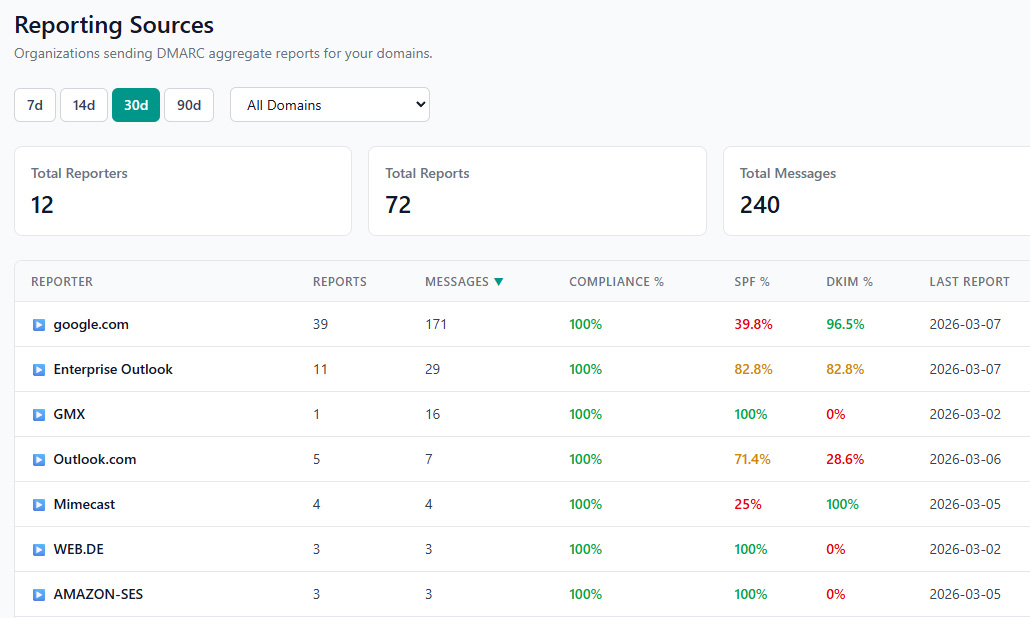
Aggregate Report Processing
Every DMARC report parsed, categorized, and ready for analysis — automatically.
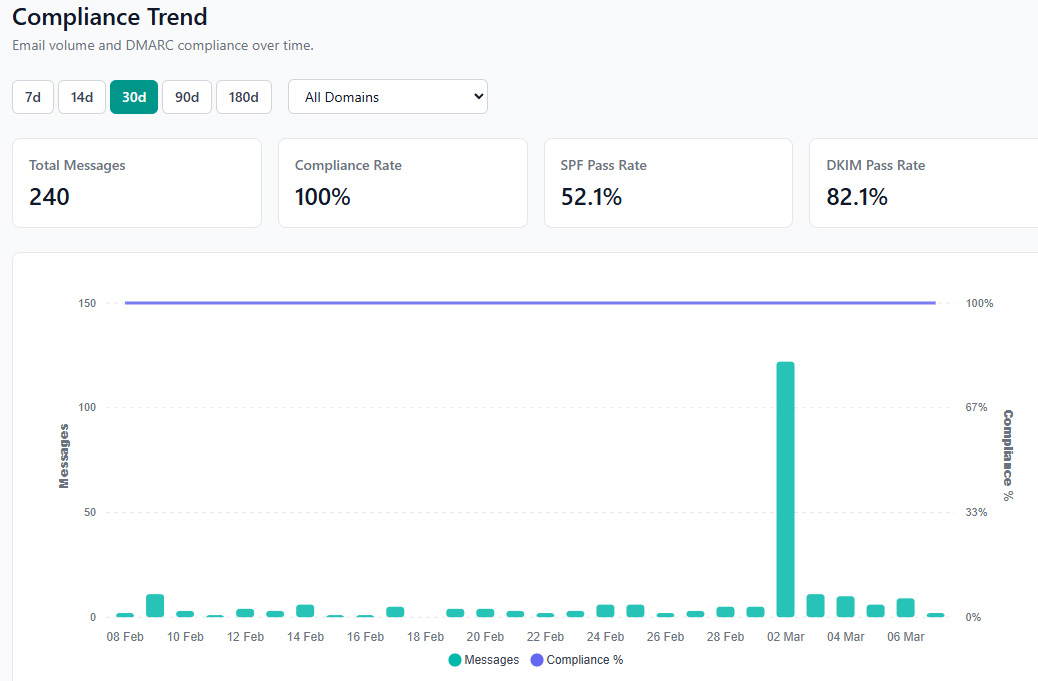
Compliance Dashboard
Track pass and fail rates over time to understand your authentication posture at a glance.
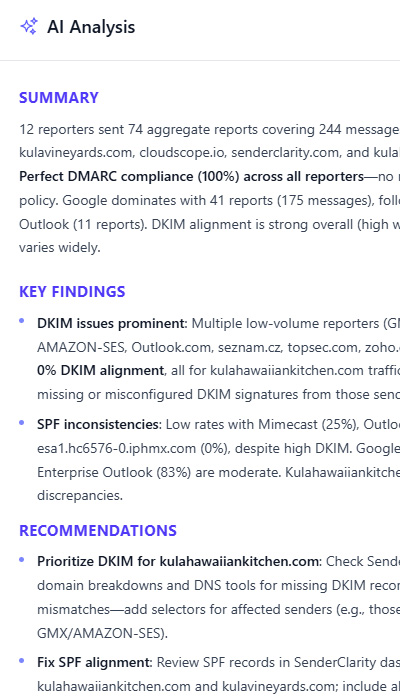
AI-Powered Report Analysis
Raw DMARC data is overwhelming — hundreds of source IPs, nested authentication results, and ambiguous failures. SenderClarity's AI cuts through the noise.
It analyzes your aggregate reports, identifies which senders are misconfigured, explains the root cause of failures, and tells you exactly what DNS records to change. No more guessing whether a failing source is a spoofing attempt or a legitimate service you forgot to authorize.
The AI also assesses your readiness to move from none to quarantine to reject — so you advance your policy with evidence, not hope.
What You Get with DMARC Monitoring
Automatic Report Processing
DMARC XML reports collected and parsed without any manual effort. Point your RUA and we handle the rest.
Source IP Analysis
Identify every IP address sending email as your domain. Know which are legitimate services and which are unauthorized.
Compliance Trending
Daily and weekly compliance charts so you can track improvement and spot regressions immediately.
Policy Recommendations
Health scores factor in your current policy and compliance data to guide you toward enforcement.
Forensic Insights
Drill into individual sending sources to understand exactly why messages pass or fail authentication.
Real-Time Alerts
Get notified via Slack, Teams, or email when compliance drops or new sources appear.
The Path to DMARC Enforcement
Move from monitoring to full protection at your own pace.
p=none
Monitor
Collect reports without affecting mail delivery. Identify all legitimate senders and fix authentication gaps.
p=quarantine
Quarantine
Suspicious messages go to spam. Continue monitoring to confirm all legitimate senders still pass.
p=reject
Reject
Unauthorized messages are blocked entirely. Your domain is fully protected from spoofing and phishing.
DMARC Monitoring FAQ
p=none for 2–4 weeks to identify all legitimate senders. SenderClarity's health scores will reflect when your compliance is high enough to consider moving to quarantine or reject.
p=none does not affect delivery at all — it only collects reports. SenderClarity never changes your DNS records or mail flow. You control when (and whether) to move to enforcement.
Start Monitoring Your DMARC Reports Today
Set up in minutes. See your first reports within 24 hours. Free plan available — no credit card required.