SPF Passed. DKIM Passed. It Was Still Phishing. Here's Why.
A real-world email header breakdown that shows why passing SPF and DKIM isn't enough — and what DMARC alignment actually means.
If you manage email security, you've probably heard that SPF and DKIM are your first line of defense against spoofed email. Pass both, and you're protected, right?
Not quite.
Recently, we came across a phishing email that passed both SPF and DKIM — and Microsoft's own filters still tagged it CAT:PHISH and routed it to Junk. The recipient saw an email that appeared to come from Summit eBikes (sales@summitebikes.com). The message claimed they'd "successfully sold an item" — a classic account-takeover lure.
Let's look at the headers and break down exactly what went wrong.
The Headers
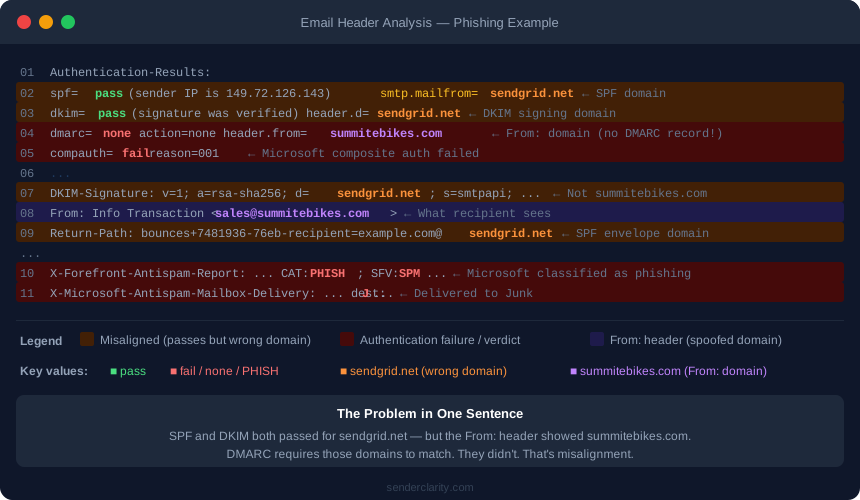
Here's the relevant portion of the raw email headers (domain anonymized):
Authentication-Results: spf=pass (sender IP is 149.72.126.143)
 smtp.mailfrom=sendgrid.net; dkim=pass (signature was verified)
 header.d=sendgrid.net; dmarc=none action=none
 header.from=summitebikes.com; compauth=fail reason=001

Received-SPF: Pass (protection.outlook.com: domain of sendgrid.net designates
 149.72.126.143 as permitted sender) receiver=protection.outlook.com;
 client-ip=149.72.126.143; helo=s.wrqvtzvf.outbound-mail.sendgrid.net;

DKIM-Signature: v=1; a=rsa-sha256; c=relaxed/relaxed; d=sendgrid.net; ...

From: Info Transaction <sales@summitebikes.com>

Return-Path: bounces+7481936-76eb-recipient=example.com@sendgrid.net
And what Microsoft's filters ultimately concluded:
X-Forefront-Antispam-Report: CAT:PHISH; SFV:SPM; ...
X-Microsoft-Antispam-Mailbox-Delivery: dest:J;
Breaking It Down
✅ SPF: Pass
SPF checks whether the sending mail server is authorized to send on behalf of a domain. In this case, the IP address 149.72.126.143 belongs to SendGrid — and SendGrid's SPF record includes it as an authorized sender.
But notice what domain passed: sendgrid.net — not summitebikes.com.
The SPF check is performed against the domain in the Return-Path (also called the envelope sender), which was:
bounces+...@sendgrid.net
SendGrid's infrastructure is legitimate. SPF pass is technically correct.
✅ DKIM: Pass
DKIM verifies a cryptographic signature on the message to confirm it wasn't tampered with in transit. The signature checked out.
But again — look at the signing domain:
DKIM-Signature: d=sendgrid.net;
The signature belongs to sendgrid.net, not summitebikes.com. SendGrid signed the message using their own keys on behalf of an unverified sender.
❌ DMARC: None (Effectively a Fail)
Here's the critical line:
dmarc=none action=none header.from=summitebikes.com
dmarc=none means summitebikes.com has no DMARC record at all. There's no policy for receiving mail servers to enforce.
But even if there were a DMARC record, the message would still have failed — because of alignment.
What Is DMARC Alignment?
This is the concept most people miss.
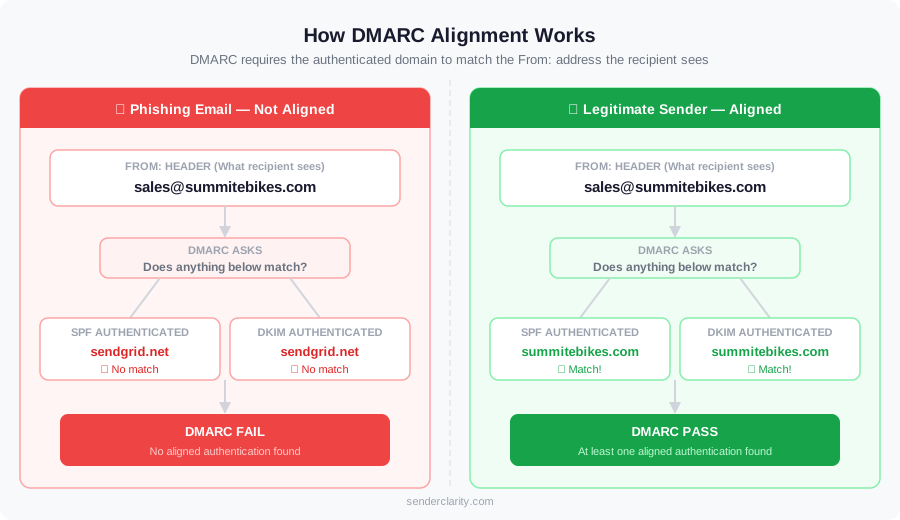
DMARC doesn't just ask "did SPF pass?" or "did DKIM pass?" It asks a more specific question:
Did the domain that passed SPF or DKIM match the domain in the
From:header?
That matching requirement is called alignment.
In this email:
| Check | Authenticated Domain | From Domain | Aligned? |
|---|---|---|---|
| SPF | sendgrid.net |
summitebikes.com |
❌ No |
| DKIM | sendgrid.net |
summitebikes.com |
❌ No |
Neither check is aligned with the From: domain the recipient actually sees. DMARC requires at least one to align — and neither did.
The attacker exploited a real, legitimate service (SendGrid) to pass basic authentication checks, while putting a completely different domain in the From: header. Without DMARC alignment enforcement, this works.
How Would a Legitimate Sender Look?
If summitebikes.com were a real business legitimately using SendGrid, their headers would look different in two key ways:
1. DKIM alignment via custom domain authentication in SendGrid:
DKIM-Signature: d=summitebikes.com;
This requires adding CNAME records to their DNS that point to SendGrid's signing infrastructure. The result: dkim=pass with an aligned domain.
2. A DMARC record on their domain:
_dmarc.summitebikes.com TXT "v=DMARC1; p=quarantine; rua=mailto:dmarc@summitebikes.com"
With both in place, the Authentication-Results line would show:
dmarc=pass header.from=summitebikes.com
And the compauth result would be a pass, not a failure.
Why This Matters for Your Domain
If your domain has no DMARC record — or a p=none policy — anyone can send email appearing to come from your domain through a legitimate ESP like SendGrid, Mailchimp, or any SMTP relay, and it will pass SPF and DKIM checks while completely spoofing your brand.
Your customers, partners, and vendors could receive phishing emails that appear to come from you, with no policy in place to stop them.
The fix has three parts:
- Publish a DMARC record — even
p=nonewith reporting enabled is a starting point - Configure alignment in any ESP you use (SendGrid, Mailchimp, etc.) by authenticating your domain in their platform
- Monitor your DMARC reports to understand who is sending email on behalf of your domain — legitimate or otherwise — before you move to
p=quarantineorp=reject
Check Your Domain Right Now
Not sure if your domain has a DMARC record — or whether it's configured correctly?
Check your DMARC policy for free →
It takes about 10 seconds. You'll immediately see whether your domain is protected, and if not, what's missing.
Ongoing DMARC Monitoring with SenderClarity
A one-time check tells you where you stand today. But DMARC management is an ongoing process — new email senders get added, DNS records drift, and attackers continuously probe for gaps.
SenderClarity is built for IT admins and MSPs who need to manage DMARC across one domain or dozens. It ingests your DMARC aggregate reports, classifies senders, flags alignment failures, and walks you through moving from p=none to full enforcement — without breaking legitimate email in the process.
Have a header you'd like us to break down? Questions about your DMARC setup? Contact us or drop it in the comments below.
Rating
Comments
Be the first to post a comment!